

Most stores lose the race before they write a single word. Slow pages, messy URLs, and thin category pages quietly bury them. That hurts. You spent months sourcing products and shooting photos. Then Google shows your best seller on page four.
Ecommerce SEO is the process of optimizing your online store so its category and product pages rank higher in search results. The most effective tips are matching search intent, improving site structure, writing unique page content, fixing Core Web Vitals, adding Product schema, and earning backlinks.
This guide fixes that. You get 10 ecommerce SEO tips, a checklist, and a 90 day plan. Every tip works on Shopify, WooCommerce, and BigCommerce.
What Is the Importance of SEO for Ecommerce?
SEO matters for ecommerce because it gives you traffic you own. You can’t rent traffic forever. Paid ads stop the second your budget does. Rankings keep working while you sleep. That is why the ecommerce SEO tips in this guide focus on long term growth, not quick tricks.
The numbers vary by study. Similarweb’s 2025 SEO benchmark put organic search at 23.56% of ecommerce traffic. Other reports say 40% or more. Your own Google Analytics 4 data matters more than any average.
The surprise. Similarweb’s Global State found that shoppers referred by ChatGPT converted at 11.4%. In contrast, organic search visitors converted at 5.3%. These figures cover July 2024 to June 2025. Visitors with clear questions tend to buy faster.
Speed matters as much. A Deloitte study for Google found that a 0.1 second mobile speed gain lifted retail conversion rate by 8.4%. That’s about one blink.Expect early traction in three to six months. Competitive niches take longer. SEO rewards patient stores and punishes impatient ones.
Not sure where your store stands? Request a free SEO audit
10 SEO Best Practices for Ecommerce Sites to Rank Higher
Work through these in order. Each one builds on the last.
1. Focus on Search Intent and Long Tail Keywords
Rank for what shoppers actually type, not what you wish they typed. Every search has an intent, and each intent needs a different page.
| Intent | Example search | Page that should rank |
| Informational | how to choose running shoes | Buying guide |
| Commercial | best trail running shoes | Category page or comparison |
| Transactional | buy Nike Pegasus 41 size 10 | Product page |
Use Google Keyword Planner, Semrush, or Ahrefs to find long tail keywords. These longer phrases face less competition and show stronger buying intent. Then open the Search Console. Filter for queries ranking between positions 8 and 20. Those pages sit one good edit from page one.
Assign one primary keyword per page. Two pages chasing the same phrase fight each other. SEOs call that keyword cannibalization. Your rankings call it a bad week.
2. Build a Search Engine Friendly ecommerce Site Architecture
A search engine friendly ecommerce site helps Google and shoppers find any product in three clicks or less. Think of a pyramid. The homepage sits on top, then categories, subcategories, and products.
Keep URLs short and readable. Use example.com/shoes/running-shoes/ instead of example.com/p?id=88&cat=3. Some platforms, such as Shopify, add fixed prefixes like /collections/. That’s fine. Just keep the rest of the URL clean. Add breadcrumbs so shoppers and crawlers can see the path.
Next, use internal linking on purpose. Link your bestsellers from high traffic pages. Write descriptive anchor text such as “waterproof hiking boots” instead of “click here.”
Orphan pages hurt most. Google can’t rank what it can’t find. Run a crawl with Screaming Frog to spot them.
3. Improve Product Pages for Search and Shoppers
Write every product page for the person holding a credit card. Then check that Google can read it.
Start with the basics. Put the main keyword in the meta title, the H1, and the first sentence. Write a meta description that sells the click. Keep titles near 60 characters so they don’t get cut off.
Next, replace manufacturer copy. Hundreds of stores paste the same supplier text. That creates duplicate content and gives Google no reason to pick you. Add what the supplier skipped. Cover real sizing, materials, who the product suits, and who should skip it. Our product description template makes this faster.
My advice, though some SEOs disagree: Don’t rewrite 4,000 descriptions all at once. Start with your top 50 sellers. Measure the results, then continue.
4. Make Category Pages Your Top Ranking Asset
Category pages usually outrank product pages. They match broad, high volume searches like “women’s running shoes.” Imagine this conversation. The owner says, “We have 200 blog posts. Why can’t we rank for running shoes?” The answer is almost always the category page.
Most stores leave it empty. A title, a grid, and nothing else. That’s a missed opportunity. Add two or three sentences above the grid. Say what the category offers and who it suits. Add buying advice and links to related guides below the products. Keep filters useful.
Handle pagination carefully. Page two and beyond should stay crawlable. Give each paginated page a self referencing canonical tag.Unpopular opinion: most stores need better category pages, not more blog posts. Fix the money pages first.
5. Fix Technical SEO and Core Web Vitals
Picture a shopper tapping “Add to cart” and nothing happens. She taps again. Then she leaves. You worked hard for that visit, and a slow script cost you the sale.
Core Web Vitals measure that pain. Google replaced First Input Delay with Interaction to Next Paint (INP) on March 12, 2024. Some guides still list the old metric. Don’t copy them.
| Metric | What it measures | Good score |
| LCP (Largest Contentful Paint) | Loading speed | 2.5 seconds or less |
| INP (Interaction to Next Paint) | Responsiveness | 200 milliseconds or less |
| CLS (Cumulative Layout Shift) | Visual stability | 0.1 or less |
Google evaluates each metric using the 75th percentile of actual visits. You can find more details in Google’s Web Vitals guide. It uses data from the Chrome User Experience Report. You can test your pages with PageSpeed Insights.
Fix mobile issues first because Google ranks mobile pages. Submit an XML sitemap. Ensure robots.txt blocks cart and account pages but not product pages. Use canonical tags for variants. Simplify redirect chains. Large stores should monitor their crawl budgets. Refer to our Core Web Vitals guide for detailed steps.
6. Add Product Schema and Google Merchant Center Listings
Structured data helps Google understand your page’s content. Use JSON-LD with schema.org types. For stores, use Product, Offer, AggregateRating, Review, and BreadcrumbList.
Include price, availability, brand, and GTIN where you have them. Then validate the markup with Google’s Rich Results Test. Shoppers can see stars, price, and stock status before they click. That can lift the click through rate.
Connect Google Merchant Center too. It lets your products appear in free listings across Google. Keep your schema and your feed consistent. A price mismatch can get products disapproved.
One warning. Skip FAQ schema if you want rich results. Google limited them in August 2023. Its documentation now says FAQ rich results stopped appearing on May 7, 2026. Write FAQs for readers and AI answers instead. Most Shopify themes add basic Product schema. Many WooCommerce plugins do too. Still, check yours.
7. Optimize Product Images and Video
Images carry ecommerce. They also wreck page speed faster than anything else.
Compress images to WebP format. Name files clearly, like “black leather chelsea boots.webp.” Write alt text to describe the image for screen readers. This improves accessibility and helps with Google Images.
Lazy load images below the fold. Never lazily load your main product image. It hurts LCP. Shoppers can find products using Google Lens. So, clear photos on simple backgrounds are helpful.
Add a short video for buyers needing proof. Focus on fit, scale, or setup. A 4 MB hero image isn’t “high quality.” It leads to a bounce.
8. Build Trust With Reviews and E-E-A-T Signals
Google looks for Experience, Expertise, Authoritativeness, and Trust, called E-E-A-T. Shoppers look for the same things, only faster. Would you hand your card to a store with no returns policy?
Collect verified reviews. They offer user generated content in your customers’ words. This aligns with how people search. They also support Aggregate Rating schema.
Make trust easy to find. Show your returns policy, shipping times, contact details, and a real About page. Put real names on buying guides. Add why that person knows the product.
9. Build Topical Authority and Get Cited in AI Overviews
Topical authority means Google sees your store as a go to source on a subject. Build it with hub and spoke content. One category page is the hub. Buying guides, comparisons, and how tos are the spokes. Link them together. Start with a running shoe buying guide.
AI search raises the stakes. A July 2025 study by the Pew Research Center revealed that people clicked links in AI overviews just 1% of the time. So, appearing in the answer is important, as is earning the click. Our guide on GEO vs SEO shows how this differs from classic rankings.
Write to be quoted. Use question headings. Put a direct answer in the first one or two sentences. Define terms plainly. Use the same product and brand names everywhere. Name your sources.
These habits also help voice search. Voice assistants read short, clear answers aloud.
10. Get Backlinks with Digital PR
Backlinks show Google that other sites trust you. Quality is better than quantity.
Publish something worth citing. A shoe store could share anonymized sizing data by region. A coffee gear shop could test grinders and publish the results. Journalists and bloggers link to original data. Our digital PR guide covers outreach.
Reclaim unlinked brand mentions. Search your brand name, find mentions with no link, and ask politely. Ask suppliers and partners to link from their “where to buy” pages.
Skip paid link schemes. Google’s spam systems catch them, and cleanup costs far more than the links ever earned.
There’s no shortcut. The slow way simply works.
Advanced SEO for Ecommerce: What Comes After the Basics?
Once the ten methods run smoothly, dive deeper. Faceted navigation creates many filter URLs.
Control these with canonical tags, noindex rules, and robots.txt. This helps your crawl budget focus on important pages. Check how JavaScript frameworks render.
Google might miss content that loads late. Review server log files to see what Googlebot crawls. Selling internationally? Use hreflang tags. Lastly, submit URLs to Bing via IndexNow to index new products faster.
Ecommerce SEO Checklist: Your Quick Reference
Print this ecommerce SEO checklist. Tackle one item each week.
- Group keywords by intent.
- Keep each product within three clicks.
- Rewrite top product pages with original text.
- Add intro text and buying tips to category pages.
- Pass LCP, INP, and CLS tests.
- Add Product schema and link to Merchant Center.
- Compress images and include alt text.
- Gather verified reviews and feature trust pages.
- Publish guides that answer questions clearly.
- Earn links with original data.
How to Rank for E-Commerce in 90 Days?
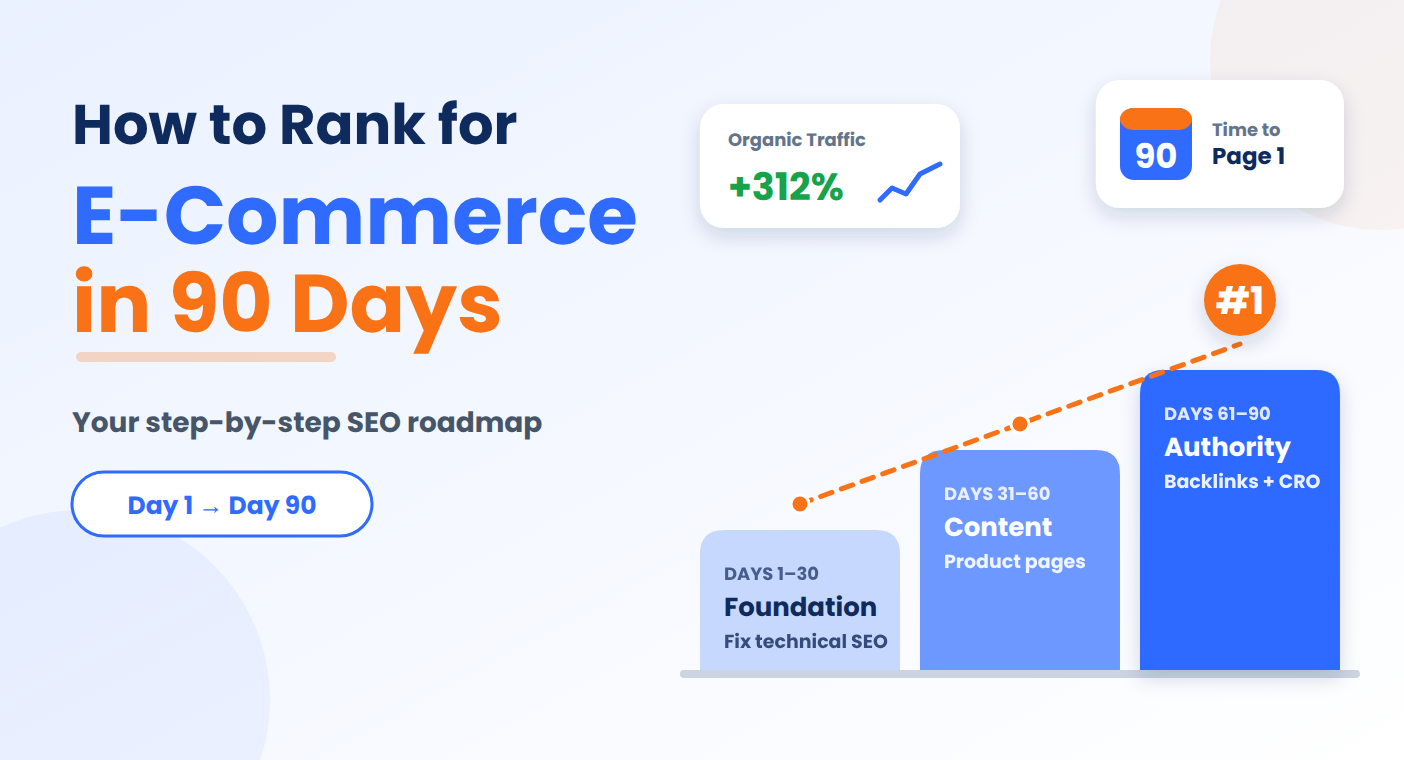
To rank an e-commerce store, start by fixing the foundation. Then, improve content and build authority. Here’s an SEO strategy to begin on Monday.
Month 1: Fix the foundation. Run a crawl. Repair broken links and redirect chains. Meet your Core Web Vitals targets. Submit your sitemap in Google Search Console.
Month 2: Improve the pages that sell. Rewrite key product and category pages. Add schema. Start collecting reviews.
Month 3: Build authority. Publish two buying guides. Share one piece of original data. Set up monthly reporting.
Focus on quality, not quantity. A half fixed store ranks like an unfixed one.
How Do You Measure Ecommerce SEO Success?
Track four numbers. Organic revenue and conversion rate live in Google Analytics 4. Click-through rate and indexed pages live in the Search Console. Review them monthly. Judges progress quarterly, because rankings move slowly. Also watch GA4 for referrals from AI tools like ChatGPT. Those visitors can convert well.
Should You Learn SEO or Hire an SEO Agency for Ecommerce?
Learn the basics either way. You can’t judge an agency without them.
Hire help when your catalog passes a few thousand products, when a migration looms, or when traffic stalls for six months. Ask any agency three questions.
Which platforms do you know? What will you report each month? Can I speak to a client in my niche?
Our guide on choosing the best SEO company covers more questions like these. Ask to see a sample report before you sign. Good reports show organic revenue, rankings, and technical fixes, not just traffic. You can see how we report results in our case studies.
Pricing varies widely, from one time audits to monthly retainers, so compare scope, reporting, and contract length, not just price.
Walk away from anyone who guarantees rankings. Nobody controls Google.
Want a second opinion on your plan? Talk to our team
Conclusion
Ecommerce SEO is not a one time fix. These ecommerce SEO tips work best when you apply them one step at a time. To improve ecommerce SEO fast, start with three moves: fix your Core Web Vitals, rewrite your category pages, and add Product schema. These deliver the quickest wins for most stores.
Then follow the 90 day plan. Fix the foundation in month one, improve the pages that sell in month two, and build authority in month three. Add original data, verified reviews, and clear buying guides along the way, so both Google and shoppers have a reason to trust your store.
Ranking isn’t luck. Pick one of these ecommerce SEO tips and do it this week.
Want expert eyes on your store? Request a free SEO audit
Frequently Asked Questions
How long does ecommerce SEO take to work?
Most stores see early gains in three to six months. Competitive niches can take six to twelve months. Technical fixes show results first. Content and backlinks take longer. Track progress in Google Search Console.
Is Shopify good for SEO?
Yes. Shopify covers the basics, including sitemaps, mobile themes, and Product schema. Its URL structure is fixed, which limits some advanced setups. Your content and page speed matter more than the platform.
How much does ecommerce SEO cost?
Costs range from free, if you do it yourself, to monthly agency retainers. Tools like Semrush add a subscription fee. Compare scope, reporting, and contract length, not just price.
Do reviews help ecommerce SEO?
Yes, indirectly. Reviews add fresh, natural language to product pages. They also power star ratings through AggregateRating schema, which can improve click through rate. Google has not confirmed review volume as a direct ranking factor.
Is SEO better than paid ads for online stores?
Neither wins alone. Ads bring fast traffic that stops when you stop paying. SEO builds slower traffic that compounds. Most healthy stores use ads for speed and SEO for long term growth.


